
[vc_row][vc_column][vc_hoverbox image=”1698″ primary_title=”Support” primary_title_font_container=”font_size:40|color:%23ffffff” primary_title_use_theme_fonts=”yes” hover_title=”Support” use_custom_fonts_primary_title=”true”][/vc_hoverbox][/vc_column][/vc_row][vc_row container=”on” css=”.vc_custom_1631232550646{margin-top: 0px !important;border-top-width: 0px !important;padding-top: 0px !important;}”][vc_column][vc_text_separator title=”Claim Lost or Damaged” i_icon_fontawesome=”fas fa-flag-checkered” i_color=”green” i_size=”lg” title_align=”separator_align_left” add_icon=”true”]
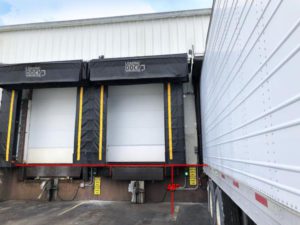
[/vc_column][/vc_row][vc_row show_title=”” container=”on” css=”.vc_custom_1631232520661{margin-top: 0px !important;border-top-width: 0px !important;padding-top: 0px !important;}”][vc_column][vc_text_separator title=”FAQ” i_icon_fontawesome=”fas fa-question-circle” i_color=”green” i_size=”lg” title_align=”separator_align_left” add_icon=”true”][vc_tta_tabs active_section=”1″][vc_tta_section i_icon_fontawesome=”fas fa-truck” add_icon=”true” title=”Service & Features” tab_id=”1631218791173-4e91b3c5-20a2″][vc_empty_space][vc_toggle title=”How soon after I sign up can I begin shipping?”]You can begin shipping immediately.[/vc_toggle][vc_empty_space][vc_toggle title=”Does UUCargo allow me to get online quotes?”]Yes, you can get instant quotes for LTL and FTL trucking; moreover, you can place an order online.[/vc_toggle][vc_empty_space][vc_toggle title=”Does UUCargo offer warehousing and additional services as well?”]Yes, we can warehouse your pallets, and wrap your stocks.[/vc_toggle][vc_empty_space][vc_toggle title=”Does UUCargo allow me to keep an address book for my regular customers?”]Yes, you can keep a database of regular customers in your UUCargo address book to save you time by not having to re-enter the same address information day after day.[/vc_toggle][vc_empty_space][vc_toggle title=”What is a standard loading dock?”]In North America, the most commonly found dock height is 48–52 inches or (120–130 cm), though heights of up to 55 inches (140 cm) occur as well. A dock leveller can be used to bridge the gap between a truck and a warehouse to safely accommodate a forklift.
 [/vc_toggle][vc_empty_space][/vc_tta_section][vc_tta_section i_icon_fontawesome=”fas fa-tags” add_icon=”true” title=”Price & Fee & Payment” tab_id=”1631218791157-1f6c63e7-f89e”][vc_empty_space][vc_toggle title=”Are there any monthly fees or any other hidden fees associated with being a UUCargo member?”]There are no fees.[/vc_toggle][vc_empty_space][vc_toggle title=”Will I be charged immediately after I placed order?”]No. We will pre-authorize the amount equals to your order price. You will be charged when a driver claimed your shipment.[/vc_toggle][/vc_tta_section][vc_tta_section i_icon_fontawesome=”fas fa-shield-alt” add_icon=”true” title=”Security” tab_id=”1631219448722-529bf37f-8d46″][vc_empty_space][vc_toggle title=”Does UUCargo get and store my credit card infomations?”]No. We use the most popular payment companies to pre-authorize and charge credit cards in our business, such as Stripe or Paypal, which means we can NOT get any entire credit card information.[/vc_toggle][vc_empty_space][/vc_tta_section][/vc_tta_tabs][/vc_column][/vc_row][vc_row show_title=”” container=”on” css=”.vc_custom_1631232520661{margin-top: 0px !important;border-top-width: 0px !important;padding-top: 0px !important;}”][vc_column][vc_raw_html]JTNDYSUyMG5hbWUlM0QlMjJncHMtYXBwJTIyJTIwaWQlM0QlMjJTZXR1cEFwcCUyMiUzRSUzQyUyRmElM0U=[/vc_raw_html][vc_text_separator title=”How to install and setup GPS-Tracker App on smart phones?” i_icon_fontawesome=”fas fa-question” i_color=”green” i_size=”lg” title_align=”separator_align_left” add_icon=”true”][vc_toggle title=”What App we use”]
We use Traccar as our GPS Tracking Platform, and we also use Traccar Client as an app to install into drivers’ smart phones.[/vc_toggle][vc_empty_space][vc_toggle title=”How to download and install”]
Traccar Client for Android Phone
Traccar Client for iPhone
[/vc_toggle][vc_empty_space][vc_toggle title=”How to setup the App and get identifier”]Step 1. Open the Traccar Client application on your mobile phone.
Step 2. Set Server URL as http://gps.uucargo.ca:5055
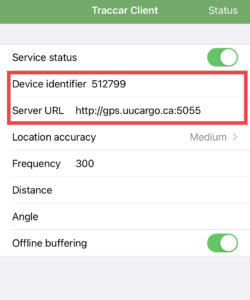
Step 3. Then copy the identifier number. In this example, the identifier number is 512799.
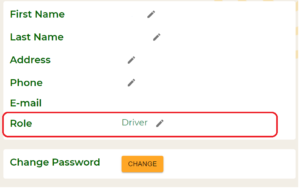
Step 4. Sign in to our application through https://app.uucargo.ca and go to the user profile page. Make sure your role is Driver.
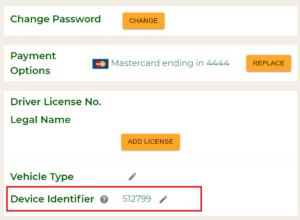
Step 5. Scroll down to the bottom of the page and enter your identifier number. In this example, the identifier that we copied from the Traccar mobile client is 512799.
Step 6. You are all done. Enjoying working with UUCargo.[/vc_toggle][/vc_column][/vc_row][vc_row container=”on” css=”.vc_custom_1631232550646{margin-top: 0px !important;border-top-width: 0px !important;padding-top: 0px !important;}”][vc_column][vc_text_separator title=”Ask for support” i_icon_fontawesome=”fas fa-comment-alt” i_color=”green” i_size=”lg” title_align=”separator_align_left” add_icon=”true”]
[/vc_column][/vc_row][vc_row container=”on” css=”.vc_custom_1631232550646{margin-top: 0px !important;border-top-width: 0px !important;padding-top: 0px !important;}”][vc_column][vc_text_separator title=”Send email to us” i_icon_fontawesome=”fas fa-envelope” i_color=”green” i_size=”lg” title_align=”separator_align_left” add_icon=”true”][vc_hoverbox image=”1394″ primary_title=”Hover to show email” hover_title=”support@uucargo.ca” el_width=”40″ align=”left”][/vc_hoverbox][/vc_column][/vc_row]